Showing posts with label mobile. Show all posts

Tuesday, 9 August 2011

Multifunction and Rugged Mobile Printers


Multifunction Printers

Computer technology is constantly improving on itself, yet one area that seem appears to receive little attention is printer technology. Many home businesses not only require printing functions but scanning, copying and faxing as well. Frequently, each of these devices is set-up as a separate piece of equipment, requiring not only significant investment of money but of office space as well. One of the newer creations in the field is the multifunction printer, with the ability to print, scan and fax. With a multifunction printer one electronic piece of equipment completes all these jobs and takes up much less space as well as costing much less money than the combination of all devices purchased separately.

However, when the key to a multifunction printer is that it does all of these functions adequately but none of them to the degree of a stand-alone device. There are several features that need to be taken into account when researching a multifunction printer that best meets one's individual needs.

The first feature that needs to be taken into consideration is the type of printer: multi-function printers can be inkjet, laserjet, or color laserjet. Inkjet printers operate by forcing variably-sized droplets of ink onto a piece of paper or similar medium. A laser printer produces text and graphics on plain paper, using the same technology as digital photocopiers; they employ a xerographic printing process but differ from analog photocopiers in that the image is produced by the direct scanning of a laser beam across the printer's photoreceptor.

The speed of a laser printer or inkjet printer is measured by the ppm (pages per minute), the number of pages a laser or inkjet printer can produce in one minute. Print speeds of laser or inkjet printers may vary depending on many factors such as the complexity of the document, page coverage, and the design of the printer itself. Generally, as the speed increases, the quality of the output decreases. A typical inkjet printer may print at speeds that vary between 1 to 28 pages per minute for black text and 1 to 20 pages per minute for color, photographs or graphics. The speed of a mid-range monochrome laser printer may vary between 6 to 25 pages per minute for sharp black texts and 2 to 20 pages per minute for black and white graphics. The print speed of a typical color laser printer's will vary between 6 to 20 pages per minute for black text and 1 to 12 pages per minute for color graphics. Image quality is another feature to examine and depends on the number dots per inch printed. The standard resolution of 600 x 600 dots per inch is sufficient for most everyday printing but is unsuitable for printing quality photographs or graphics. The more dots printed per inch, the higher the image quality.

The scanner function is also of great importance in a multifunction printer that can use two types of scanning technologies. A charge-coupled device (CCD) uses a light-sensitive integrated circuit that stores and displays the data for an image in such a way that each picture element, or dot, in the image is converted into an electrical charge. Contact Image Sensors (CIS), used more with flatbed scanners, place the image sensor in near direct contact with the object to be scanned in contrast to using mirrors to bounce light to a stationary sensor, as is the case in conventional CCD scanners. A CIS typically consists of a linear array of detectors, covered by a focusing lens with LEDs that allow the CIS to be highly power efficient, with many scanners being powered through the minimal line voltage supplied via a USB connection. CIS devices typically produce lower image quality compared to CCD devices but make the printer more durable. Another feature of scanning is how the documents are scanned; they can be fed in a sheet at a time, in which case an automatic document feeder that holds at least 50 sheets facilitates use, or they can be scanned over a flat-bed. The flat-bed ones allow scanning of thicker objects.

The faxing function is properly the one that may be the most simplistic. A minimum fax/modem speed should be 33 Kbps. Other fax features that might be offered are color faxing, fax broadcasting, and/or group dialing, as many multifunction printers do not offer full fax functions.

Finally, given all the functions a multifunction printer requires to carry out, a lack of internal memory is extremely noticeable. While 8 MB of memory may be adequate for home office or small office use, an efficient and effective multifunction printer that have at least 16 MB of memory or more. The greater the amount of memory, the faster that certain multifunction printer processes can be carried out.

Rugged Mobile Printers

Rugged mobile printers are built rugged laptops. Being mobile, they can pretty much fit in your pocket or glove compartment. Rugged mobile printers can be mounted in vehicles next to your rugged notebook or some are mounted directly to a rugged computing device. A rugged printer is made to take a beating and most can withstand drops from nearly 10 feet. The rugged mobile printer is geared around the MIL-STD 810F test confirming its ruggedness and ability to handle the daily rigors of everyday use. From 2.5" to 4" receipt printers, to full sheet 8" x 11" size printers. A rugged printer will handle any job while on the road printing inventory receipts or printing law enforcement issued citations.


Visit http://www.OCRuggedLaptops.com for more information about the rugged mobile printers.


This post was made using the Auto Blogging Software from WebMagnates.org This line will not appear when posts are made after activating the software to full version.

Saturday, 23 July 2011

How Mobile Science Carts Can Benefit Schools, Colleges and Universities


Last year, the Royal Society of Chemistry (RSC) released a statement claiming that 65 per cent of school laboratories were sub-standard or uninspiring, and that it would cost £1.9 billion to bring them up to scratch. Faced with such a significant cost, a mobile science cart could be a viable alternative to fixed laboratories for schools and academies, helping them to save money and make better use of restricted space. The carts are designed to operate as a fully mobile science laboratory, often complete with glassware, a fully functioning sink and tap, data loggers and ample storage space for equipment.

Other than reducing cost, mobile science carts are perhaps most beneficial as a way to utilise a school's space more effectively. Consisting of most of the equipment that you would expect to find in a traditional laboratory, a science cart could even be used to replace a fixed laboratory in the same way that a laptop charging trolley could replace a desktop ICT suite. Although doing away with fixed laboratories may not be an option for every school, it is certainly an option worth considering if space is an issue. Designed with a small footprint, the carts can easily be locked away in an office or storage cupboard overnight to keep chemicals out of reach, or bolted to the floor to prevent unauthorised personnel wheeling them away.

In addition to replacing traditional science classrooms, mobile science carts are also a fantastic tool for demonstration. Due to their mobility, the carts can be transported throughout buildings and be placed at the front of lecture halls, classes, assemblies and other events to be used as a teacher demonstration station. This is especially useful for primary schools that may not have a fixed laboratory and may want to keep chemicals away from young children. Carts that use data logging equipment are perfect for demonstration because the results of numerous experiments, gauging variables like temperature, magnetic fields and heart rates, can be easily displayed to the audience.

So, if schools are considering purchasing a mobile science laboratory, what type of things should they look out for?

There are a few different manufacturers of science carts on the market, but this certainly doesn't mean that the products that they offer are all of the same standard. If a school is using the cart to replace their existing laboratory, it is essential that the cart has a fully functioning sink, tap and a chemically resistant work surface to enable experiments to be carried out. The cabinet should also be constructed of fully welded steel for enhanced security; this is especially important if dangerous chemicals or valuable laptops will be stored inside. Schools would also do well to select a cart that has been treated against corrosion or rust to reduce the risk of their investment being subject to excess wear and tear.

If the mobile science laboratory has been configured to store laptops, schools must ensure that they choose a cart that charges the devices with pre-configured leads. This safety feature will ensure that no liquid can come into contact with electricity. Devices such as cameras and packaged 'science kits' of experiments are also included on particular models, but, when determining value for money, schools should consider if these items are really necessary, or if they already have this equipment.

With space and finance becoming increasingly restricted for schools, a mobile science cart could provide a viable alternative to fixed laboratories and an excellent teaching station for experiments. Mobile science laboratories help to reduce costs, save space, and provide the facilities to teach science anywhere, anytime.


V. Cole


This post was made using the Auto Blogging Software from WebMagnates.org This line will not appear when posts are made after activating the software to full version.

Friday, 24 June 2011

Undo certain Gmail actions in your mobile browser

Sometimes when I’m using Gmail on my phone, I delete a message by mistake or label it incorrectly. Sure I can fish the message out of my Trash or remove the label and apply the correct one, but that takes several steps. Even just a few seconds is usually enough time to catch those annoying mistakes.


Now when you use the Gmail mobile web app, you’ll have a small window of opportunity to undo four key actions: archive, delete, add or remove a label, or move a message/conversation.


When you take one of these actions, Gmail displays a yellow bar that recaps what you just did and allows you to undo it:


This bar stays in position even if you move to another screen (e.g. moving to ‘Menu’ from ‘Inbox’). If you don’t happen to catch your mistake in time, not to worry: all four actions can still be undone through other means (e.g. you can move a message from Trash back into your Inbox).


Try it out at gmail.com in the browser of your Android or iOS device.


Update: 9:09am Pacific time 4/19/11 - This update is available for phones running Android or iOS, but not tablet devices with the two-pane Gmail UI. It is also now available for BlackBerry OS 6.0 phones.


Generated by BlogIt

BlogIt - Auto Blogging Software for YOU!

BlogIt - autoblogging software for YOU

BlogIt - autoblogging software for YOU

Introducing “News near you” on Google News for mobile

(Cross-posted from the Google News blog)


Google News for mobile lets you keep up with the latest news, wherever you are. Today we’re excited to announce a new feature in the U.S. English edition called “News near you” that surfaces news relevant to the city you’re in and surrounding areas.


Location-based news first became available in Google News in 2008, and today there’s a local section for just about any city, state or country in the world with coverage from thousands of sources. We do local news a bit differently, analyzing every word in every story to understand what location the news is about and where the source is located.


Now you can find local news on your smartphone. Here’s an example of a “News near you” mobile section automatically created for someone in Topeka, Kansas:


To use this feature, visit Google News from the browser of your Android smartphone or iPhone. If this is the first time you are visiting Google News on your phone since this feature became available, a pop-up will ask you if you want to share your location. If you say yes, news relevant to your location will appear in a new section called “News near you” which will be added at the bottom of the homepage. You can reorganize the sections later via the personalization page.


You can turn off the feature at any time either by hiding the section in your personalization settings or by adjusting your mobile browser settings. Please visit the Help Center for further details.


So, go to news.google.com from your smartphone and get the latest news from wherever you are.


Posted by Navneet Singh, Product Manager, Google News


Generated by BlogIt

BlogIt - Auto Blogging Software for YOU!

BlogIt - autoblogging software for YOU

BlogIt - autoblogging software for YOU

Launch a mobile business with The Guide to the App Galaxy

The Guide to the App Galaxy, which we showed off last week at Google I/O, is designed to help mobile app developers—regardless of platform—navigate the complexities of launching an app and building a business on mobile. As you maneuver through the "galaxy” using the arrow keys on your keyboard, you’ll get the basics about app promotion, monetization and measurement—with tips from Google as well as successful developers. Read more on the Official Google Blog.


Post content by Lauren Usui, 


Generated by BlogIt

BlogIt - Auto Blogging Software for YOU!

BlogIt - autoblogging software for YOU

BlogIt - autoblogging software for YOU

Google Maps on your mobile browser

(Cross-posted from the Google Lat Long Blog)

With 40% of Google Maps usage on mobile devices, we want you to have a consistent Google Maps experience wherever you use it. So, today we’re announcing our updated Google Maps experience for mobile browsers on Android and iOS.

Now, when you visit maps.google.com on your phone or tablet’s browser and opt-in to share your location, you can use many of the same Google Maps features you’re used to from the desktop. This will allow you to:
  • See your current location
  • Search for what’s nearby with suggest and auto complete
  • Have clickable icons of popular businesses and transit stations
  • Get driving, transit, biking, and walking directions
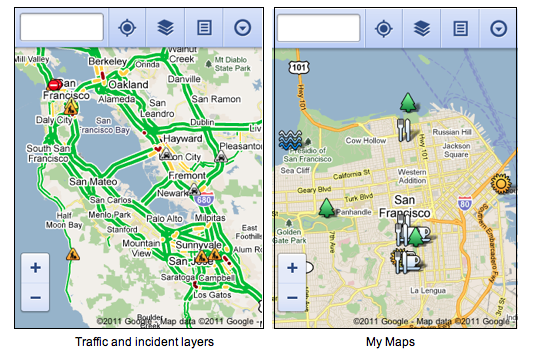
  • Turn on satellite, transit, traffic, biking, and other layers
  • View Place pages with photos, ratings, hours, and more
  • When signed into your Google account, access your starred locations and My Maps
This past weekend, I was at a team off-site at a ropes course and needed to find a good deli spot to grab lunch. I opened Google Maps on my mobile browser and searched to locate a popular deli nearby. A few finger taps later, I had viewed photos and reviews on the deli’s Place page and found the quickest way to get there using driving directions- all from my mobile browser.

Google Maps for mobile browsers is platform independent - you will always get a consistent experience and the latest features without needing to install any updates, no matter what phone you use.

To get started exploring Google Maps in your mobile browser, go to http://maps.google.com or any domain where Google Maps is available. Learn more in our help center.


Generated by BlogIt

BlogIt - Auto Blogging Software for YOU!

BlogIt - autoblogging software for YOU

BlogIt - autoblogging software for YOU

Introducing new features to mobile search

Our thirst for knowledge extends beyond the time we spend in front of our desktop computers. At Google, we are seeing mobile search grow at an exponential rate, increasing five-fold worldwide in just the past two years - a rate comparable to the early days of desktop Google Search. Today on mobile, we can get whatever information we’re looking for anytime, anywhere.

And I'm not just talking about looking up basic information like the weather or a stock quote, which is what people used to do in the early days of mobile search. As mobile devices have become more powerful and connected to faster networks, smartphone users are doing a surprisingly diverse set of search tasks -- from simple lookups, to tasks that involve multiple complex searches.

But it's not always easy to search from a mobile device, especially with the smaller screens and keyboards. We’ve worked relentlessly to make mobile search faster, easier, and more intuitive with features like autocomplete, Voice Search, Google Goggles, Google Instant and Instant Previews on mobile. Our work in mobile has now inspired desktop innovations like Voice Search and Search by Image, two new ways to search from your desktop, announced today at our Inside Search media event. We’re also excited to introduce two new mobile features designed to make mobile search even better.

With more searches happening when people are on the go, we’ve noticed an increase in searches for nearby places. To make it easier for people to search for what’s around them, we’ve introduced new shortcuts to commonly searched local categories, like restaurants, coffee shops and bars, in the form of icons on the mobile google homepage (www.google.com):


Shortcut icons appear at the bottom of the mobile homepage. Tap “More”, to select from additional popular categories like shopping, ATMs, gas stations, etc., a new part of our simplified Places homepage (www.google.com/m/places).


On the results page, you'll see a map with markers for your current location and places around you. When you scroll through the results, the map remains at the top of the page and adjusts automatically to the listing you are looking at. That way, you can see the listing information while still getting location context from the map. Tapping on a result will quickly show you more about a place including reviews and other useful details. Discovering great places nearby has never been easier on your mobile phone.


Another mobile improvement we’ve introduced today is an easier way to build longer, more complicated searches. You can now add suggested phrases to the search box and “build” your search piece by piece. This feature is already available on the Google Search app for Android and iOS devices and we’re now making this available on www.google.com from your mobile browser. Watch the video below to see how you can search faster with less typing.


These new mobile features are now available on www.google.com on Android (version 2.2+) and iOS (version 4.0+) in 40 languages worldwide.

If you would like to learn more about today’s announcements, visit the Inside Search website, our new one-stop shop for Google search tips, features and an under the hood look at our technology. Check the site later today and you’ll find a recording of the event, answers to common questions and links to other blogs posts today on the Official Google Blog, Inside Search blog and the Chrome blog.

We hope you enjoy these new search features and we look forward to bringing you further improvements by making mobile search even faster, easier, and more useful.


Generated by BlogIt

BlogIt - Auto Blogging Software for YOU!

BlogIt - autoblogging software for YOU

BlogIt - autoblogging software for YOU

Google Sites owners: Sites now auto-optimizes for mobile devices

As the dramatic growth of the mobile web changes the way people consume content, it’s becoming increasingly important for publishers to provide a good mobile experience. With this in mind, we just added automatic mobile rendering in Google Sites for iOS 3.0+ and Android 2.2+ devices, and a mobile version of the Google Sites lists. Learn more on the Google Docs blog.


Posted by Luciano Cheng, Software Engineer


Generated by BlogIt

BlogIt - Auto Blogging Software for YOU!

BlogIt - autoblogging software for YOU

BlogIt - autoblogging software for YOU