Showing posts with label with. Show all posts

Friday, 24 June 2011

See your location history dashboard and more with Google Maps 5.3 for Android

Today, we’re happy to announce Google Maps 5.3 for Android, which lets you see your Google Location History dashboard, check in at “home,” and add your own aspects for places when rating them.

Location History dashboard
If you’ve enabled Location History for Google Latitude, you’ve been able to visualize interesting trends in your location history with a personal dashboard at google.com/latitude on your computer. Now, you can also see your dashboard on your phone by tapping View location history from your Latitude profile. You’ll be able to see right on your phone how far you’ve travelled as well as an estimate of how much time you’ve spent at home, at work, or out.

If you haven’t yet, you can enable Location History from your computer or from Latitude’s Settings menu on your phone. Location History is 100% opt-in and is private to you and nobody else. You can always delete any of your location history from the Manage History tab or correct the estimated work and home locations from the dashboard on your computer.

View your location history dashboard from your Latitude profile on your phone and see estimates of where you’ve spent your time.

Check in at home
Now that you can see how much time you spend at “home”, you might want to let friends know when you’re there. Checking in at places using Latitude is another way to keep a history of places you’ve been and also lets you share when you’re there. I love letting friends and family know when I’m at a cafe or park, but sometimes I want them to know that I’m relaxing at home or made it back safely from a road trip. So now, I can start checking in at “home” in Latitude:
  1. Check in from Latitude and tap “Home - Tap to set your location” at the bottom of the nearby places list if you don’t have one yet.
  2. Use the estimated current address or enter in your home address yourself.
  3. Once you’ve checked in at home once, “Home” will appear at the top of the list when you’re checking in near there.

Like Latitude and other check-ins, checking in at home is entirely opt-in. Your set “home” location is not searchable and only you can check in there. Just like any other check-in, you can choose with whom to share your home check-ins (along with your name and address info).

Add your own aspects for places
When you’re rating places on the go in Maps using Google Places with Hotpot, you could always quickly leave feedback on a specific aspect or characteristic of a place, such as the food or ambiance. Before, we’d automatically include aspects about places that were commonly mentioned in reviews. Now, you can add your own aspects for each place. So if you think a place has a beautiful view or great music, you can add it yourself and quickly share it with the world.

When rating places, you can add your own aspects like “music” for places and leave quick feedback.

To get started, update Google Maps from Android Market on devices with Android OS 1.6+ anywhere Google Maps and Latitude are already available.


Generated by BlogIt

BlogIt - Auto Blogging Software for YOU!

BlogIt - autoblogging software for YOU

BlogIt - autoblogging software for YOU

Share and personalize your Google Goggles experience with Goggles 1.4

Since its launch, we have worked to make Google Goggles faster and more accurate when returning search results for a wide variety of images. Today, we are taking several steps to make Goggles a better and more personal experience. Goggles 1.4 for Android devices introduces an enhanced search history experience, the ability to suggest better results to Google if we are not able to accurately match your image, and improved business card recognition.

Enhanced search history
The new search history experience lets you search your Goggles results, make personal notes on specific results and share your results with friends. When you add a personal note to a Goggles result, the note will appear in your search history. I’m trying to learn more about wine, so when I taste something new, it’s easy for me to add a note to help me remember what I liked about the wine. Later, I can search my search history for words in my note to help me find that bottle that went so well with steak. Read more about how to enable search history for Goggles here.

To make a personal note, tap the pencil in the corner when viewing a search result.

Notes are intended to help you better organize your search history, so if you choose to share a result with a friend, your notes will not be shared. However, you can always add a personalized message to your friend when you share your results with them.

Share a result by sending a link to your friends.


Suggest a better result
We are constantly working to improve the accuracy of Goggles at recognizing certain categories of items, but visual recognition is still a complicated task. With Goggles 1.4, you are now able to suggest a better result when Goggles cannot find an image match, or the quality of the result is poor.

To send your suggestion to Google, tap “Can you suggest a better result?” on the results page. You can then select the relevant part of the image and submit a tag. Tags will be used to improve recognition in object categories where Goggles already provides some results, like artwork or wine bottles.

When suggesting a better result, you can crop the image and add a description.


Improved business card recognition
Business card recognition is one of the most popular uses of Google Goggles, so we're rolling out some new updates to make the experience even quicker and easier. Additionally, instead of simply recognizing the content as text, Goggles now recognizes the information as a contact, making it easier to add to your phone's contact list.

Call or add the person directly as a contact

Google Goggles is available for Android 1.6+ devices. Download it by visiting Android Market or by scanning the QR code below:


Generated by BlogIt

BlogIt - Auto Blogging Software for YOU!

BlogIt - autoblogging software for YOU

BlogIt - autoblogging software for YOU

Launch a mobile business with The Guide to the App Galaxy

The Guide to the App Galaxy, which we showed off last week at Google I/O, is designed to help mobile app developers—regardless of platform—navigate the complexities of launching an app and building a business on mobile. As you maneuver through the "galaxy” using the arrow keys on your keyboard, you’ll get the basics about app promotion, monetization and measurement—with tips from Google as well as successful developers. Read more on the Official Google Blog.


Post content by Lauren Usui, 


Generated by BlogIt

BlogIt - Auto Blogging Software for YOU!

BlogIt - autoblogging software for YOU

BlogIt - autoblogging software for YOU

Check-ins and rating places get easier with Google Maps 5.5 for Android

(Cross posted from Google LatLong Blog)

We’ve made it easier to check in and out of places, rate various locations, and get transit information with Google Maps 5.5 for Android. This release adds ‘check in’ and ‘rate and review’ buttons to Place pages, the option to edit your home/work address for Latitude, and redesigned transit station pages.

Read below for more details about the new features, which we hope will improve your user experience, a topic we take very seriously as there are now more than 200 million users of Google Maps for mobile across platforms and devices worldwide.

New check-in and rating buttons added to Place pages

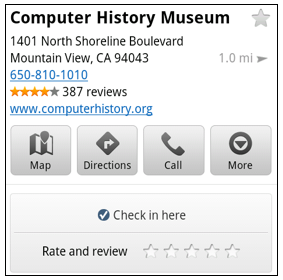
Now when you open a Place page from your mobile device, you can check in to places with Google Latitude or submit a rating or review by clicking on two new buttons at the top of the listing.

This past week I had the chance to explore the Computer History Museum during my visit to San Francisco from across the pond in London. Once nearby, I could quickly open the museum’s Place page and check in.

When I was ready to leave and head to lunch, in a few seconds I could go back to the Place page and rate the museum – which certainly earned the 5 star rating it received from me.

Update home and work address for your Latitude Location History

Last month we released the Location History dashboard for Latitude which estimates how much time you spend at home, work, and everywhere else. If your home or work address changes, or you’d rather set a different address to represent ‘home’ and ‘work,’ you can now edit these addresses within Latitude.

Change home/work location from Location History dashboard

View the redesigned transit station pages

It’s been about two years since we added transit directions in Google Maps for Android. Since then, we’ve increased the coverage from 250 cities to more than 440 and counting - the most recent being Washington, D.C. To make it easier to plan your transit route, we updated the transit station pages in this release to better organize the information you need.

Each page now includes a list of upcoming scheduled departures for different lines, all the transit lines serving the station, and links to nearby transit stations.


Download Google Maps 5.5 for Android here to try out the new check-in and rating buttons, update your Latitude Location History home/work address, check out a transit station in a nearby city, or just make sure you have the latest version of Google Maps for Android. This update requires an Android OS 1.6+ device anywhere Google Maps is currently available. Learn more in our help center.


Generated by BlogIt

BlogIt - Auto Blogging Software for YOU!

BlogIt - autoblogging software for YOU

BlogIt - autoblogging software for YOU

Know when your bus is late with live transit updates in Google Maps


(Cross-posted on the Official Google Blog)

Often when I’m taking public transit, I arrive at my stop on time only to anxiously check my watch and look down the street for my bus, which is running late once again. Those extra minutes I’m forced to wait seem like an eternity, and the only information I can access on my phone is when the bus was supposed to arrive.

Starting now, Google Maps for mobile and desktop can tell you when your ride is actually going to arrive with new live transit updates. We partnered with transit agencies to integrate live transit data in four U.S. cities and two European cities: Boston, Portland, Ore., San Diego, San Francisco, Madrid and Turin.


When you click on a transit station or plan a transit route with Google Maps and there are delays or alerts related to your trip, you’ll now see “live departure times” (indicated with a special icon) and service alerts.


Live transit departure times after tapping on a station


Live service alerts when receiving transit directions


Live departures and alerts on desktop


We’re working with our public transit partners to help them provide live data to more people in more cities. You can get live transit updates in the latest version of Google Maps for mobile (requires Android 1.6+), as well as Google Maps on all supported desktop and mobile browsers.


Generated by BlogIt

BlogIt - Auto Blogging Software for YOU!

BlogIt - autoblogging software for YOU

BlogIt - autoblogging software for YOU