Showing posts with label Android. Show all posts

Friday, 24 June 2011

See your location history dashboard and more with Google Maps 5.3 for Android

Today, we’re happy to announce Google Maps 5.3 for Android, which lets you see your Google Location History dashboard, check in at “home,” and add your own aspects for places when rating them.

Location History dashboard
If you’ve enabled Location History for Google Latitude, you’ve been able to visualize interesting trends in your location history with a personal dashboard at google.com/latitude on your computer. Now, you can also see your dashboard on your phone by tapping View location history from your Latitude profile. You’ll be able to see right on your phone how far you’ve travelled as well as an estimate of how much time you’ve spent at home, at work, or out.

If you haven’t yet, you can enable Location History from your computer or from Latitude’s Settings menu on your phone. Location History is 100% opt-in and is private to you and nobody else. You can always delete any of your location history from the Manage History tab or correct the estimated work and home locations from the dashboard on your computer.

View your location history dashboard from your Latitude profile on your phone and see estimates of where you’ve spent your time.

Check in at home
Now that you can see how much time you spend at “home”, you might want to let friends know when you’re there. Checking in at places using Latitude is another way to keep a history of places you’ve been and also lets you share when you’re there. I love letting friends and family know when I’m at a cafe or park, but sometimes I want them to know that I’m relaxing at home or made it back safely from a road trip. So now, I can start checking in at “home” in Latitude:
  1. Check in from Latitude and tap “Home - Tap to set your location” at the bottom of the nearby places list if you don’t have one yet.
  2. Use the estimated current address or enter in your home address yourself.
  3. Once you’ve checked in at home once, “Home” will appear at the top of the list when you’re checking in near there.

Like Latitude and other check-ins, checking in at home is entirely opt-in. Your set “home” location is not searchable and only you can check in there. Just like any other check-in, you can choose with whom to share your home check-ins (along with your name and address info).

Add your own aspects for places
When you’re rating places on the go in Maps using Google Places with Hotpot, you could always quickly leave feedback on a specific aspect or characteristic of a place, such as the food or ambiance. Before, we’d automatically include aspects about places that were commonly mentioned in reviews. Now, you can add your own aspects for each place. So if you think a place has a beautiful view or great music, you can add it yourself and quickly share it with the world.

When rating places, you can add your own aspects like “music” for places and leave quick feedback.

To get started, update Google Maps from Android Market on devices with Android OS 1.6+ anywhere Google Maps and Latitude are already available.


Generated by BlogIt

BlogIt - Auto Blogging Software for YOU!

BlogIt - autoblogging software for YOU

BlogIt - autoblogging software for YOU

Listen to more languages in Google Translate for Android

(Cross-posted on the Google Translate blog)

Today we launched an update to Google Translate for Android that allows you to listen to translations in several more languages.

We’ve dramatically improved the quality of our spoken translations in over 15 languages, including Russian, Chinese and Portuguese, and added the ability to listen to three new languages: Japanese, Arabic and Korean. Text-to-speech is one of the most popular features of this mobile interface. Whether you’re learning how to say a foreign phrase, or trying to share information with someone in their language, simply tap the Speaker icon after doing a translation and you’ll hear the difference.


With today’s launch, Google Translate for Android supports translation between 58 languages and can speak translations in 24 languages. The application works on phones and tablets running Android 2.1 and above. To download Google Translate for Android, scan the QR code below, or visit us on the Android Market.


Generated by BlogIt

BlogIt - Auto Blogging Software for YOU!

BlogIt - autoblogging software for YOU

BlogIt - autoblogging software for YOU

Introducing the new Google Docs app for Android

(Cross posted on the Google Docs Blog, and Google Enterprise Blog)

Increasingly, people are using mobile phones to access information -- from email to web browsing to editing documents. Part of getting work done on the go is being able to easily access, edit and share content, which is why we’re happy to announce the new Google Docs app for Android.

With this new app it’s easy to filter and search for your content across any Google account, then jump straight into editing docs using the online mobile editors. The app also allows you to easily share items with contacts on your phone, right from within the app.


The Docs app also allows you to upload content from your phone and open documents directly from Gmail. You can also add a widget to your home screen for easy access to three core tasks: jumping to your starred documents, taking a photo to upload, or creating a new document with one tap.


And my favorite feature: Using the app and your phone’s camera, you can turn photos with text into editable Google documents with the power of optical character recognition (OCR). Just create a new ‘Document from Photo' or select the camera icon from the widget, and your converted document will appear in your documents list shortly after you snap the picture. You can also convert photos already stored on your phone by sharing them with the Google Docs app. OCR does a pretty good job capturing unformatted text in English but won't recognize handwriting or some fonts - stay tuned, it will get better over time!


The Google Docs app is currently available in English and works on Android 2.1+ phones. Try it out by scanning the QR code below or by visiting Android Market.


Let us know what you think of the new Google Docs Android app in our forum.


Generated by BlogIt

BlogIt - Auto Blogging Software for YOU!

BlogIt - autoblogging software for YOU

BlogIt - autoblogging software for YOU

Video Chat on Your Android Phone

Sometimes, the expressions on a person's face can mean much more than what they say. To help you stay in touch with your friends and family, we’re launching Google Talk with video and voice chat for Android phones.


You can now video or voice chat with your friends, family and colleagues right from your Android phone, whether they’re on their compatible Android tablet or phone, or using Gmail with Google Talk on their computer. You can make calls over a 3G or 4G data network (if your carrier supports it) or over Wi-Fi.


In your Google Talk friends list, a video or voice chat button will appear next to your contacts and you can simply touch the button to connect with them. Any text chats from the person you’re talking with will be overlaid on your phone’s screen so you can read them without having to leave the video. And, if you need to check something else, the video pauses automatically so you can go back to your phone’s home screen or another app. The audio will keep going even though the video has paused. Check out how this works:


Google Talk with video and voice chat will gradually roll out to Nexus S devices in the next few weeks as part of the Android 2.3.4 over-the-air update and will launch on other Android 2.3+ devices in the future. To learn more about using video and voice chat, check out our Help Center.


Post content


Generated by BlogIt

BlogIt - Auto Blogging Software for YOU!

BlogIt - autoblogging software for YOU

BlogIt - autoblogging software for YOU

New ways to discover great apps on Android Market

We’ve seen tremendous growth in Android Market lately. With over 200,000 apps supporting over 300 Android devices, we’ve had 4.5 billion applications installed to date. But with so many apps available, how do you find the ones you really want? Whether you’re looking for the most popular apps, hot new apps, or just the very best apps available, we want to help make sure that you find what you’re looking for.


Today, we’re excited to announce 5 new features for Android Market focused on helping you find apps you’ll love.


  • New top app charts - We’ve revamped our top app charts to be fresher and country-specific, so you get the most current, relevant results. We’ve also added top new free, top new paid, and top grossing lists, all right on the Android Market home page.   

  • Editors’ Choice - These are some of the very best apps available for Android, as chosen by the Android Market staff. They span everything from games to productivity and beyond.   

  • Top Developers - We’re also recognizing those developers creating the highest quality, most popular, and most notable apps available on Android Market. They’ll get a special icon on our Android Market website, appearing wherever the developer name is shown, starting today for an initial set of over 150 developers.

  • Better related apps - On the left side of an app page, you’ll now see two groups of related apps: apps frequently browsed by people who viewed this app, and apps that people tend to install alongside this app. For example, people who view ScoreMobile, my favorite sports score app, often also view other sports score apps, while those who install ScoreMobile tend to also install apps for specific sports leagues or teams. We’ll also show you related apps once you decide to install an app.

  • Trending apps - Finally, we’ve added a new section to the Android Market homepage showing trending apps – those apps that are quickly growing in daily installs. Look here to stay ahead of the curve and find new apps as they get hot.

We hope you find these features helpful as you explore the many greats apps available on Android Market. These new features are available now on http://market.android.com, and will be coming soon to Android Market on phones and tablets.


Posted by Fernando Delgado, Product Manager, Android Market


Generated by BlogIt

BlogIt - Auto Blogging Software for YOU!

BlogIt - autoblogging software for YOU

BlogIt - autoblogging software for YOU

Check-ins and rating places get easier with Google Maps 5.5 for Android

(Cross posted from Google LatLong Blog)

We’ve made it easier to check in and out of places, rate various locations, and get transit information with Google Maps 5.5 for Android. This release adds ‘check in’ and ‘rate and review’ buttons to Place pages, the option to edit your home/work address for Latitude, and redesigned transit station pages.

Read below for more details about the new features, which we hope will improve your user experience, a topic we take very seriously as there are now more than 200 million users of Google Maps for mobile across platforms and devices worldwide.

New check-in and rating buttons added to Place pages

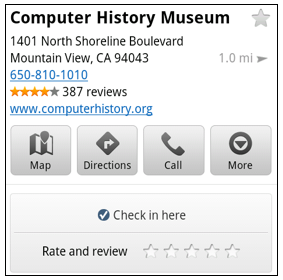
Now when you open a Place page from your mobile device, you can check in to places with Google Latitude or submit a rating or review by clicking on two new buttons at the top of the listing.

This past week I had the chance to explore the Computer History Museum during my visit to San Francisco from across the pond in London. Once nearby, I could quickly open the museum’s Place page and check in.

When I was ready to leave and head to lunch, in a few seconds I could go back to the Place page and rate the museum – which certainly earned the 5 star rating it received from me.

Update home and work address for your Latitude Location History

Last month we released the Location History dashboard for Latitude which estimates how much time you spend at home, work, and everywhere else. If your home or work address changes, or you’d rather set a different address to represent ‘home’ and ‘work,’ you can now edit these addresses within Latitude.

Change home/work location from Location History dashboard

View the redesigned transit station pages

It’s been about two years since we added transit directions in Google Maps for Android. Since then, we’ve increased the coverage from 250 cities to more than 440 and counting - the most recent being Washington, D.C. To make it easier to plan your transit route, we updated the transit station pages in this release to better organize the information you need.

Each page now includes a list of upcoming scheduled departures for different lines, all the transit lines serving the station, and links to nearby transit stations.


Download Google Maps 5.5 for Android here to try out the new check-in and rating buttons, update your Latitude Location History home/work address, check out a transit station in a nearby city, or just make sure you have the latest version of Google Maps for Android. This update requires an Android OS 1.6+ device anywhere Google Maps is currently available. Learn more in our help center.


Generated by BlogIt

BlogIt - Auto Blogging Software for YOU!

BlogIt - autoblogging software for YOU

BlogIt - autoblogging software for YOU