Showing posts with label your. Show all posts

Friday, 24 June 2011

See your location history dashboard and more with Google Maps 5.3 for Android

Today, we’re happy to announce Google Maps 5.3 for Android, which lets you see your Google Location History dashboard, check in at “home,” and add your own aspects for places when rating them.

Location History dashboard
If you’ve enabled Location History for Google Latitude, you’ve been able to visualize interesting trends in your location history with a personal dashboard at google.com/latitude on your computer. Now, you can also see your dashboard on your phone by tapping View location history from your Latitude profile. You’ll be able to see right on your phone how far you’ve travelled as well as an estimate of how much time you’ve spent at home, at work, or out.

If you haven’t yet, you can enable Location History from your computer or from Latitude’s Settings menu on your phone. Location History is 100% opt-in and is private to you and nobody else. You can always delete any of your location history from the Manage History tab or correct the estimated work and home locations from the dashboard on your computer.

View your location history dashboard from your Latitude profile on your phone and see estimates of where you’ve spent your time.

Check in at home
Now that you can see how much time you spend at “home”, you might want to let friends know when you’re there. Checking in at places using Latitude is another way to keep a history of places you’ve been and also lets you share when you’re there. I love letting friends and family know when I’m at a cafe or park, but sometimes I want them to know that I’m relaxing at home or made it back safely from a road trip. So now, I can start checking in at “home” in Latitude:
  1. Check in from Latitude and tap “Home - Tap to set your location” at the bottom of the nearby places list if you don’t have one yet.
  2. Use the estimated current address or enter in your home address yourself.
  3. Once you’ve checked in at home once, “Home” will appear at the top of the list when you’re checking in near there.

Like Latitude and other check-ins, checking in at home is entirely opt-in. Your set “home” location is not searchable and only you can check in there. Just like any other check-in, you can choose with whom to share your home check-ins (along with your name and address info).

Add your own aspects for places
When you’re rating places on the go in Maps using Google Places with Hotpot, you could always quickly leave feedback on a specific aspect or characteristic of a place, such as the food or ambiance. Before, we’d automatically include aspects about places that were commonly mentioned in reviews. Now, you can add your own aspects for each place. So if you think a place has a beautiful view or great music, you can add it yourself and quickly share it with the world.

When rating places, you can add your own aspects like “music” for places and leave quick feedback.

To get started, update Google Maps from Android Market on devices with Android OS 1.6+ anywhere Google Maps and Latitude are already available.


Generated by BlogIt

BlogIt - Auto Blogging Software for YOU!

BlogIt - autoblogging software for YOU

BlogIt - autoblogging software for YOU

Undo certain Gmail actions in your mobile browser

Sometimes when I’m using Gmail on my phone, I delete a message by mistake or label it incorrectly. Sure I can fish the message out of my Trash or remove the label and apply the correct one, but that takes several steps. Even just a few seconds is usually enough time to catch those annoying mistakes.


Now when you use the Gmail mobile web app, you’ll have a small window of opportunity to undo four key actions: archive, delete, add or remove a label, or move a message/conversation.


When you take one of these actions, Gmail displays a yellow bar that recaps what you just did and allows you to undo it:


This bar stays in position even if you move to another screen (e.g. moving to ‘Menu’ from ‘Inbox’). If you don’t happen to catch your mistake in time, not to worry: all four actions can still be undone through other means (e.g. you can move a message from Trash back into your Inbox).


Try it out at gmail.com in the browser of your Android or iOS device.


Update: 9:09am Pacific time 4/19/11 - This update is available for phones running Android or iOS, but not tablet devices with the two-pane Gmail UI. It is also now available for BlackBerry OS 6.0 phones.


Generated by BlogIt

BlogIt - Auto Blogging Software for YOU!

BlogIt - autoblogging software for YOU

BlogIt - autoblogging software for YOU

Share and personalize your Google Goggles experience with Goggles 1.4

Since its launch, we have worked to make Google Goggles faster and more accurate when returning search results for a wide variety of images. Today, we are taking several steps to make Goggles a better and more personal experience. Goggles 1.4 for Android devices introduces an enhanced search history experience, the ability to suggest better results to Google if we are not able to accurately match your image, and improved business card recognition.

Enhanced search history
The new search history experience lets you search your Goggles results, make personal notes on specific results and share your results with friends. When you add a personal note to a Goggles result, the note will appear in your search history. I’m trying to learn more about wine, so when I taste something new, it’s easy for me to add a note to help me remember what I liked about the wine. Later, I can search my search history for words in my note to help me find that bottle that went so well with steak. Read more about how to enable search history for Goggles here.

To make a personal note, tap the pencil in the corner when viewing a search result.

Notes are intended to help you better organize your search history, so if you choose to share a result with a friend, your notes will not be shared. However, you can always add a personalized message to your friend when you share your results with them.

Share a result by sending a link to your friends.


Suggest a better result
We are constantly working to improve the accuracy of Goggles at recognizing certain categories of items, but visual recognition is still a complicated task. With Goggles 1.4, you are now able to suggest a better result when Goggles cannot find an image match, or the quality of the result is poor.

To send your suggestion to Google, tap “Can you suggest a better result?” on the results page. You can then select the relevant part of the image and submit a tag. Tags will be used to improve recognition in object categories where Goggles already provides some results, like artwork or wine bottles.

When suggesting a better result, you can crop the image and add a description.


Improved business card recognition
Business card recognition is one of the most popular uses of Google Goggles, so we're rolling out some new updates to make the experience even quicker and easier. Additionally, instead of simply recognizing the content as text, Goggles now recognizes the information as a contact, making it easier to add to your phone's contact list.

Call or add the person directly as a contact

Google Goggles is available for Android 1.6+ devices. Download it by visiting Android Market or by scanning the QR code below:


Generated by BlogIt

BlogIt - Auto Blogging Software for YOU!

BlogIt - autoblogging software for YOU

BlogIt - autoblogging software for YOU

Google Maps on your mobile browser

(Cross-posted from the Google Lat Long Blog)

With 40% of Google Maps usage on mobile devices, we want you to have a consistent Google Maps experience wherever you use it. So, today we’re announcing our updated Google Maps experience for mobile browsers on Android and iOS.

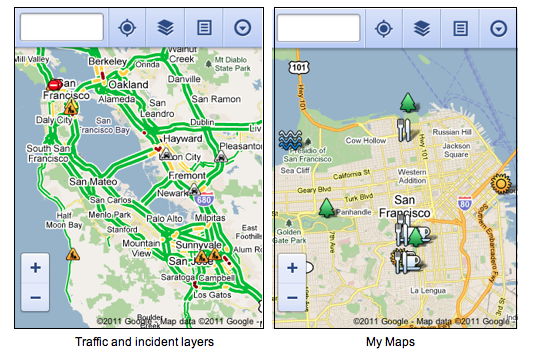
Now, when you visit maps.google.com on your phone or tablet’s browser and opt-in to share your location, you can use many of the same Google Maps features you’re used to from the desktop. This will allow you to:
  • See your current location
  • Search for what’s nearby with suggest and auto complete
  • Have clickable icons of popular businesses and transit stations
  • Get driving, transit, biking, and walking directions
  • Turn on satellite, transit, traffic, biking, and other layers
  • View Place pages with photos, ratings, hours, and more
  • When signed into your Google account, access your starred locations and My Maps
This past weekend, I was at a team off-site at a ropes course and needed to find a good deli spot to grab lunch. I opened Google Maps on my mobile browser and searched to locate a popular deli nearby. A few finger taps later, I had viewed photos and reviews on the deli’s Place page and found the quickest way to get there using driving directions- all from my mobile browser.

Google Maps for mobile browsers is platform independent - you will always get a consistent experience and the latest features without needing to install any updates, no matter what phone you use.

To get started exploring Google Maps in your mobile browser, go to http://maps.google.com or any domain where Google Maps is available. Learn more in our help center.


Generated by BlogIt

BlogIt - Auto Blogging Software for YOU!

BlogIt - autoblogging software for YOU

BlogIt - autoblogging software for YOU

Coming soon: make your phone your wallet

(cross-posted to Official Google Blog and Google Commerce Blog)


Today in our New York City office, along with Citi, MasterCard, First Data and Sprint, we gave a demo of Google Wallet, an app that will make your phone your wallet. You’ll be able to tap, pay and save using your phone and near field communication (NFC). We’re field testing Google Wallet now and plan to release it soon.


Google Wallet is a key part of our ongoing effort to improve shopping for both businesses and consumers. It’s aimed at making it easier for you to pay for and save on the goods you want, while giving merchants more ways to offer coupons and loyalty programs to customers, as well as bridging the gap between online and offline commerce.


Because Google Wallet is a mobile app, it will do more than a regular wallet ever could. You'll be able to store your credit cards, offers, loyalty cards and gift cards, but without the bulk. When you tap to pay, your phone will also automatically redeem offers and earn loyalty points for you. Someday, even things like boarding passes, tickets, ID and keys could be stored in Google Wallet.


At first, Google Wallet will support both Citi MasterCard and a Google Prepaid Card, which you’ll be able to fund with almost any payment card. From the outset, you’ll be able to tap your phone to pay wherever MasterCard PayPass is accepted. Google Wallet will also sync your Google Offers, which you’ll be able to redeem via NFC at participating SingleTap™ merchants, or by showing the barcode as you check out. Many merchants are working to integrate their offers and loyalty programs with Google Wallet.


With Google Wallet, we’re building an open commerce ecosystem, and we’re planning to develop APIs that will enable integration with numerous partners. In the beginning, Google Wallet will be compatible with Nexus S 4G by Google, available on Sprint. Over time, we plan on expanding support to more phones.


To learn more please visit our Google Wallet website at www.google.com/wallet.


This is just the start of what has already been a great adventure towards the future of mobile shopping. We’re incredibly excited and hope you are, too.


Generated by BlogIt

BlogIt - Auto Blogging Software for YOU!

BlogIt - autoblogging software for YOU

BlogIt - autoblogging software for YOU

Know when your bus is late with live transit updates in Google Maps


(Cross-posted on the Official Google Blog)

Often when I’m taking public transit, I arrive at my stop on time only to anxiously check my watch and look down the street for my bus, which is running late once again. Those extra minutes I’m forced to wait seem like an eternity, and the only information I can access on my phone is when the bus was supposed to arrive.

Starting now, Google Maps for mobile and desktop can tell you when your ride is actually going to arrive with new live transit updates. We partnered with transit agencies to integrate live transit data in four U.S. cities and two European cities: Boston, Portland, Ore., San Diego, San Francisco, Madrid and Turin.


When you click on a transit station or plan a transit route with Google Maps and there are delays or alerts related to your trip, you’ll now see “live departure times” (indicated with a special icon) and service alerts.


Live transit departure times after tapping on a station


Live service alerts when receiving transit directions


Live departures and alerts on desktop


We’re working with our public transit partners to help them provide live data to more people in more cities. You can get live transit updates in the latest version of Google Maps for mobile (requires Android 1.6+), as well as Google Maps on all supported desktop and mobile browsers.


Generated by BlogIt

BlogIt - Auto Blogging Software for YOU!

BlogIt - autoblogging software for YOU

BlogIt - autoblogging software for YOU